网页浏览总次数

2012年8月7日星期二

转IPhone之自定义弹出窗口

IPhone之自定义弹出窗口

初始化代码:

if (!_alertView)
{
_alertView = [[UIAlertView alloc] initWithTitle:title message:@"\n\n\n" delegate:self cancelButtonTitle:@"取消" otherButtonTitles:@"登录", nil];
_alertView.delegate = self;

usernameField = [[UITextField alloc] initWithFrame:CGRectMake(12.0, 50.0, 260.0, 25.0)];
usernameField.delegate = self;
usernameField.placeholder = @"用户名";
usernameField.autocapitalizationType = UITextAutocapitalizationTypeNone;
usernameField.autocorrectionType = UITextAutocorrectionTypeNo;
usernameField.returnKeyType = UIReturnKeyNext;
usernameField.keyboardType = UIKeyboardTypeEmailAddress;
[usernameField setBackgroundColor:[UIColor whiteColor]];
[_alertView addSubview:usernameField];

passwordField = [[UITextField alloc] initWithFrame:CGRectMake(12.0, 85.0, 260.0, 25.0)];
passwordField.delegate = self;
passwordField.placeholder = @"密码";
passwordField.secureTextEntry = YES;
passwordField.returnKeyType = UIReturnKeyGo;
[passwordField setBackgroundColor:[UIColor whiteColor]];
[_alertView addSubview:passwordField];

CGAffineTransform myTransform = CGAffineTransformMakeTranslation(0.0, 00.0);
[_alertView setTransform:myTransform];
}else {
_alertView.title = title;
usernameField.text = nil;
passwordField.text = nil;
}

[usernameField becomeFirstResponder];
[_alertView show];

if (!_alertView)
{
_alertView = [[UIAlertView alloc] initWithTitle:title message:@"\n\n\n" delegate:self cancelButtonTitle:@"取消" otherButtonTitles:@"登录", nil];
_alertView.delegate = self;

usernameField = [[UITextField alloc] initWithFrame:CGRectMake(12.0, 50.0, 260.0, 25.0)];
usernameField.delegate = self;
usernameField.placeholder = @"用户名";
usernameField.autocapitalizationType = UITextAutocapitalizationTypeNone;
usernameField.autocorrectionType = UITextAutocorrectionTypeNo;
usernameField.returnKeyType = UIReturnKeyNext;
usernameField.keyboardType = UIKeyboardTypeEmailAddress;
[usernameField setBackgroundColor:[UIColor whiteColor]];
[_alertView addSubview:usernameField];

passwordField = [[UITextField alloc] initWithFrame:CGRectMake(12.0, 85.0, 260.0, 25.0)];
passwordField.delegate = self;
passwordField.placeholder = @"密码";
passwordField.secureTextEntry = YES;
passwordField.returnKeyType = UIReturnKeyGo;
[passwordField setBackgroundColor:[UIColor whiteColor]];
[_alertView addSubview:passwordField];

CGAffineTransform myTransform = CGAffineTransformMakeTranslation(0.0, 00.0);
[_alertView setTransform:myTransform];
}else {
_alertView.title = title;
usernameField.text = nil;
passwordField.text = nil;
}

[usernameField becomeFirstResponder];
[_alertView show];

自定义按钮事件代码:
其中didDismissWithButtonIndex参数为:第几个按钮点击事件

- (void)alertView:(UIAlertView *)alertView didDismissWithButtonIndex:(NSInteger)buttonIndex{
if (buttonIndex == 1) {
self.userName = usernameField.text;
self.password = passwordField.text;

[self performSelector:@selector(doResponse) withObject:nil afterDelay:0.1];
}
- (void)alertView:(UIAlertView *)alertView didDismissWithButtonIndex:(NSInteger)buttonIndex{
if (buttonIndex == 1) {
self.userName = usernameField.text;
self.password = passwordField.text;

[self performSelector:@selector(doResponse) withObject:nil afterDelay:0.1];
}
}

2011年12月20日星期二

HTML5的Message

Message API最大的优势是跨域发送消息。关于Message更多的信息请参考:
http://www.w3.org/TR/html5/comms.html#dom-messageevent-initmessageevent
https://developer.mozilla.org/en/DOM/window.postMessage

Message中一般常用的属性:
1、data 包含传入的消息,一般以会将传递的数据转化为字符串;
2、origin 返回消息来自的域,可以根据它来判断是否要处理消息,是非常基本的层级上的策略控制
3、source   相当于window.opener,这样就可以实现基本的消息互通了
这里有两个页面:index.html、postMessageTarget.html,位于同级目录(当然这两个文件可以放在不同的域中)
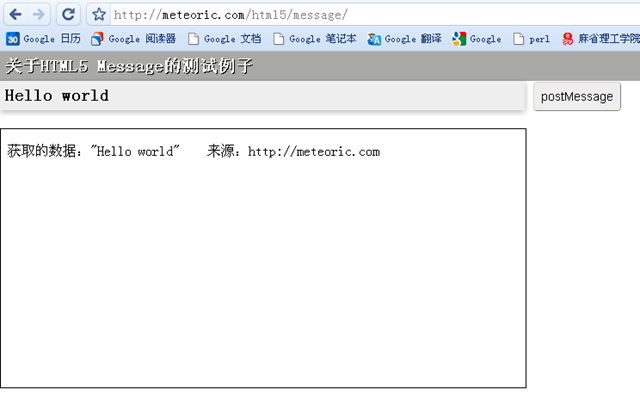
最终运行的实例效果如下图所示:
image
点击“postMessage”向iframe发出消息,iframe获取消息进行处理并回调父层文档对象的一个方法,详见代码。
index.html
<!DOCTYPE html>
<html>
 <head>
  <title>postMessageTarget</title>
  <meta charset="utf-8"> 
 <style> 
    * { margin: 0; padding: 0; font-size: 20px; }

    iframe {
        width: 610px;
        height: 300px;
        margin: 20px auto;
        border: 1px solid #000;
    }
    
    p { font-family: monospace; font-weight: bold; background: #A9A9A8; color: #fff; text-shadow: 1px 1px 0 #000; padding: 5px; height: 24px;}

    #my_message { font-family: monospace; width: 600px; font-weight: bold; height: 24px; border: 0; padding: 5px; outline: 0; background: #eee; -webkit-box-shadow: 0px 2px 10px rgba(0,0,0,.3); }

    #submit_btn {background:#eee; outline:none; border-width:1px; height:34px; -webkit-border-radius:4px; font-size:14px; padding:0 5px; cursor:pointer;}
</style>
<!--[if lte IE 8]>
    <script src="http://files.cnblogs.com/meteoric_cry/html5.js"></script>
<![endif]-->
   1:  
   2:  </head>
   3:  
   4:  <body>
   5:   
   6: <form id="the_form" action="/"> 
   7:     <p>关于HTML5 Message的测试例子</p>
   8:     <input type="text" id="my_message" value="Your message"> 
   9:     <input type="submit" value="postMessage" id="submit_btn"> 
  10: </form>
  11: <iframe id="the_iframe" src="postMessageTarget.html"></iframe> 
  12:  
  13: <script type='text/javascript'>
  14: window.onload = function () {
  15:     var iframeWin = document.getElementById("the_iframe").contentWindow,
  16:         form = document.getElementById("the_form"),
  17:         myMessage = document.getElementById("my_message");
  18:  
  19:     myMessage.select();    
  20:  
  21:     form.onsubmit = function () {
  22:         iframeWin.postMessage(myMessage.value, "http://meteoric.com");
  23:         return false;
  24:     };
  25: };
  26:  
  27: function callback(str) {
  28:     alert('callback:' + str);
  29: }
  30:  
</script> </body> </html>
postMessageTarget.html
<!DOCTYPE html>
<html>
 <head>
  <title>postMessageTarget</title>
  <meta charset="utf-8"> 
  <style> 
    body {
        background: #fff;
    }
</style> 
 </head>

 <body>
<script>
   1:  
   2: function displayMessage (evt) {
   3:     var message;
   4:     
   5:     if (evt.origin !== "http://meteoric.com") {
   6:         message = "当前提交数据被禁止!来源非法";
   7:     } else {
   8:         message = "获取的数据:\"" + evt.data + "\"  来源:" + evt.origin;
   9:     }
  10:     
  11:     document.getElementById("received_message").innerHTML = message;
  12:  
  13:     evt.source.window.callback("change title");
  14: }
  15:  
  16: // For standards-compliant web browsers
  17: if (window.addEventListener) {
  18:     window.addEventListener("message", displayMessage, false);
  19: }
  20: else {
  21:     window.attachEvent("onmessage", displayMessage);
  22: }
</script> <p id="received_message">准备就绪,等待接受数据</p> </body> </html>


有一点需要注意的是:
postMessage的目标源文档必须填写(即第二个参数,第一个参数则提交的数据),它必须与iframe对象的所在的域匹配,如果不匹配将会抛出一个安全性错误,阻止脚本继续执行。
如果目标源没有传入,JavaScript将出抛出一个错误。
image
image

上面的示例中仅仅是发送了字符串,如果需要发送非字符串数据,比如一个json对象。规范说明了当浏览器必须安全从一个域向另一个域发送数据时,会发生什么。
它说明了如何克隆,以及应该如何对待该数据。
但很遗憾,大多数浏览器是不支持,实际上,大多数浏览器只是把对象强制转转为一个字符串。这时候可以使用JSON.stringify和JSON.parse来处理了。
发送数据时,使用JSON.stringify把JSON对象转为字符串,在接收端使用JSON.parse将字符串转换为JSON对象。

index.html

<!DOCTYPE HTML PUBLIC "-//W3C//DTD HTML 4.0 Transitional//EN">  <html>    <head>    <title>HTML5</title>  </head>  <script type="text/javascript" src="http://achau.appspot.com/js_/util.js%22%3E%3C/script>  <script type="text/javascript">  var url1 = 'http://achau.appspot.com/demo/html5/crossdoc/iframe1.html';  var url2 = 'http://austinchau.googlecode.com/svn/trunk/demo/html5/crossdoc/iframe2.html';  var iframeWidth = 300;  var iframeHeight = 200;  var frameborder = 1;    window.onload = function() {        // check if HTML5 cross document 'postMessage' is supported    if (typeof window.postMessage == 'undefined') {      var div = document.createElement('div');      div.innerHTML = 'Sorry your browser does not support the ' +         '<a href="http://www.whatwg.org/specs/web-apps/current-work/#crossDocumentMessages">HTML5 Cross-Document Messaging.</a>' +        '<br>Please use Firefox 3 or IE8.';      document.body.innerHTML = '';      document.body.appendChild(div);      return;    }      buildIframes();       };    function buildIframes() {    var iframe1 = document.createElement('iframe');    iframe1.src = url1;    iframe1.width = iframeWidth;    iframe1.height = iframeHeight;    iframe1.frameborder = frameborder;      iframe1.style.border = 'solid black 1px;';        var iframe2 = document.createElement('iframe');    iframe2.src = url2;        iframe2.width = iframeWidth;    iframe2.height = iframeHeight;    iframe2.frameborder = frameborder;    iframe2.style.border = 'solid black 1px;';        document.body.appendChild(iframe1);    document.body.appendChild(iframe2);  }  </script>    <style>  body {    font-size: 12px;    color: gray;  }  </style>    <body>  This sample demonstrates two iframes of different domains passing their respective mouse coordinates to each other using <a href="http://www.whatwg.org/specs/web-apps/current-work/#crossDocumentMessages">HTML5 Cross-Document Messaging.</a>  <br><br>  [ <a href='http://code.google.com/p/austinchau/source/browse/#svn/trunk/demo/html5/crossdoc'>Source code</a> ]  <br><br>  * Move your mouse over the two iframes  <br><br>  </body>    </html>   

iframe2.html

<!DOCTYPE HTML PUBLIC "-//W3C//DTD HTML 4.0 Transitional//EN">  <html>    <head>    <title>Untitled</title>  </head>  <style>  body {    font-size: 12px;    color: gray;  }  </style>  <script type="text/javascript">      window.onload = function() {        document.getElementById('title').innerHTML = 'Domain: ' + document.location.host;        window.document.onmousemove = function(e) {        var x = (window.Event) ? e.pageX : window.event.clientX;        var y = (window.Event) ? e.pageY : window.event.clientY;        window.parent.frames[0].postMessage('x = ' + x + ' y = ' + y, '*');            };        var onmessage = function(e) {        var data = e.data;        var origin = e.origin;        document.getElementById('display').innerHTML = data;      };        if (typeof window.addEventListener != 'undefined') {        window.addEventListener('message', onmessage, false);      } else if (typeof window.attachEvent != 'undefined') {        window.attachEvent('onmessage', onmessage);      }    };    </script>    <body>  <div id="title"></div>  <br>  <div id="display"></div>  </body>    </html>   

iframe1.html


<!DOCTYPE HTML PUBLIC "-//W3C//DTD HTML 4.0 Transitional//EN"> 
<html> 
<head> 
  <title>Untitled</title> 
</head> 
<style> 
body { 
  font-size: 12px; 
  color: gray; 
} 
</style> 
<script type="text/javascript"> 
  window.onload = function() { 
     
    document.getElementById('title').innerHTML = 'Domain: ' + document.location.host; 
    window.document.onmousemove = function(e) { 
      var x = (window.Event) ? e.pageX : window.event.clientX; 
      var y = (window.Event) ? e.pageY : window.event.clientY; 
      window.parent.frames[1].postMessage('x = ' + x + ' y = ' + y, '*');       
    }; 
    var onmessage = function(e) { 
      var data = e.data; 
      var origin = e.origin; 
      document.getElementById('display').innerHTML = data; 
    }; 
    if (typeof window.addEventListener != 'undefined') { 
      window.addEventListener('message', onmessage, false); 
    } else if (typeof window.attachEvent != 'undefined') { 
      window.attachEvent('onmessage', onmessage); 
    } 
  }; 
</script> 
<body> 
<div id="title"></div> 
<br> 
<div id="display"></div> 
</body> 
</html> 

HTML5:使用postMessage实现Ajax跨域请求


由于同源策略的限制,Javascript存在跨域通信的问题,典型的跨域问题有iframe与父级的通信等。
常规的几种解决方法:
(1) document.domain+iframe; (2) 动态创建script; (3) iframe+location.hash; (4) flash。
这里不细说这几种方法,记录的是HTML5的window.postMessage。postMessage兼容IE8+、Firefox、Opera、Safari、Chrome
需要两个异域的服务器来做测试,当然也可以用本地和线上服务器作为两个异域的服务器。假如使用phonegap开发,就可以将请求文件安装在客户端,然后动态请求服务器的数据处理,获得并显示数据。这样就可以用任意Web开发语言及方法来开发phonegap App所需的后台。

1.  postMessage的用法

postMessage是HTML5为解决js跨域问题而引入的新的API,允许多个iframe/window跨域通信。
假设有结构如下:
test.html<section id="wrapper">
  <header>
    <h1>postMessage (跨域)</h1>
  </header>
  <article>
    <form>
      <p>
        <label for="message">给iframe发一个信息:</label>
        <input type="text" name="message" value="son" id="message" />
        <input type="submit" />
      </p>
    </form>
    <h4>目标iframe传来的信息:</h4>
    <p id="test">暂无信息</p>
    <iframe id="iframe"
    src="http://xiebiji.com/works/postmessage/iframe.html"></iframe>
  </article>
</section>
  
iframe.html<strong>iframe指向xiebiji.com</strong>
<form>
  <p>
    <label for="message">给父窗口发个信息:</label>
    <input type="text" name="message" value="dad" id="message" />
    <input type="submit" />
  </p>
</form>
<p id="test">暂无信息。</p>
下面是test.html里的Javascript代码(发送数据):

var win = document.getElementById("iframe").contentWindow;
document.querySelector('form').onsubmit=function(e){
  win.postMessage(document.getElementById("message").value,"*");
  if (e.preventDefault)
    e.preventDefault();
  e.returnValue = false;
}
  关键代码就一句:
win.postMessage(document.getElementById("message").value,"*");
  postMessage是通信对象的一个方法,所以向iframe通信,就是iframe对象调用postMessage方法。postMessage有两个参数,缺一不可。第一个参数是要传递的数据,第二个参数是允许通信的域,“*”代表不对访问的域进行判断,可理解为允许所有域的通信。
  然后是iframe.html里侦听接收数据的代码:
var parentwin = window.parent;
window.onmessage=function(e){
  document.getElementById("test").innerHTML = e.origin + "say:" + e.data;
  parentwin.postMessage('HI!你给我发了"<span>'+e.data+'"</span>。',"*");
};
  很简单,相信一看就懂了。e.data包含传送过来的数据,e.origin指代源域。
然后iframe.html也给test.html发送回应的数据,test.html接收数据。代码雷同,就不贴代码了。
点此查看Demo(代码素Joe哥给的)

2. Ajax跨域请求

基于以上的跨域通信,只要将Ajax代码放在iframe.html里的onmessage处理函数里头,将test.html用postMessage传过来的数据作为参数发送请求,再将返回的数据用postMessage传给test.html。这样就实现了跨域的Ajax请求。其实是很简单的东西。
贴个示例代码吧,但跟以上的代码无关。
(function(){
  //获取跨域数据
  window.onmessage = function(e){
    var url = "http://yangzebo.com/demo/noforget/test.php?msg=" + e.data;
    //Ajax
    var xhr = getXHR();
    if(xhr){
      xhr.open("GET",url,true);
      xhr.onreadystatechange = changeHandle;
      xhr.send(null);
    }else{
     alert("不支持Ajax");
    }
    function changeHandle(){//返回处理
      if(xhr.readyState == 4){
        var parentwin = window.parent;
        parentwin.postMessage(xhr.responseText,"*");//跨域发送数据
      }
    }
    function getXHR(){//获取XMLHttpRequest
      var xhr_temp;
      if(window.XMLHttpRequest){
        xhr_temp = new XMLHttpRequest();
      }else if(window.ActiveXObject){
        xhr_temp = new ActiveXObject("Microsoft.XMLHTTP");
      }else{
        xhr_temp = null;
      }
      return xhr_temp;
    }
  };
})();
  然后给个不好看的Demo
有兴趣代码请求啥的自个用开发人员工具看吧,“zebo男”是从数据库读出来的,“my msg”是sendAndReceive.html发给test.php的Ajax请求的参数,通过test.php和iframeforAjax.html回传到sendAndReceive.html。

3. 提示

要获取iframe的contentWindow才能调用postMessage。
postMessage一定要在iframe加载完成之后调用才可以正常运行。(这个耗了我好长时间)
最后要感谢Joe哥的提示和给我偷用服务器来测试的hulin小妹妹。:D
[原帖]:http://yangzebo.com/blog/?p=208

Xdomain

<!DOCTYPE html PUBLIC "-//W3C//DTD XHTML 1.0 Transitional//EN" "http://www.w3.org/TR/xhtml1/DTD/xhtml1-transitional.dtd">
<html xmlns="http://www.w3.org/1999/xhtml" xml:lang="en">
<head>
 <meta http-equiv="Content-Type" content="text/html;charset=UTF-8" />
 <title>cross-domain</title>
</head>
<body>
 <div style="width:100%;border:1px solid green;">
  <h3>this page from :<span id="host"></span></h3>
  <input type="text" value="" id="data" /><button id="btn" onclick="send();">提交</button>
 </div>

 <iframe id="iframeA" src="http://example.cn/client.html" style="border:1px solid #ff6600;width:100%;height:300px;"></iframe>
 <script type="text/javascript">
  document.getElementById('host').innerHTML = location.host;
  function send(){
   var val = document.getElementById('data').value;
   sendMessage(val);
  }
  (function(win, doc){
   var ifr = doc.getElementById('iframeA').contentWindow;
   var cb = function(json){
    alert(location.host+" get msg:"+json);
   };
   var sendMessage = function(){
    if(win.postMessage){
     if (win.addEventListener) {
                  win.addEventListener("message",function(e){
      cb.call(win,e.data);
     },false);
              }else if(win.attachEvent) {
                  win.attachEvent("onmessage",function(e){
      cb.call(win,e.data);
     });
              }
     return function(data){
      ifr.postMessage(data,'*');
     };
    }else{
     var hash = '';
    
     setInterval(function(){
    
      if (win.name !== hash) {
       hash = win.name;
       cb.call(win, hash);
      }
     }, 50);
     return function(data){
      ifr.name = data;
     };
    }
   };
   win.sendMessage = sendMessage();
  })(window, document);


 </script>
</body>
</html>